

How Better UI/UX Design Can Improve Website Engagement and Conversions
A website can attract thousands of visitors, but traffic alone does not guarantee business results. If visitors struggle to navigate the site, cannot quickly understand what a business offers, or find it difficult to complete an action, many will leave without becoming customers.
This is where UI/UX design becomes important.
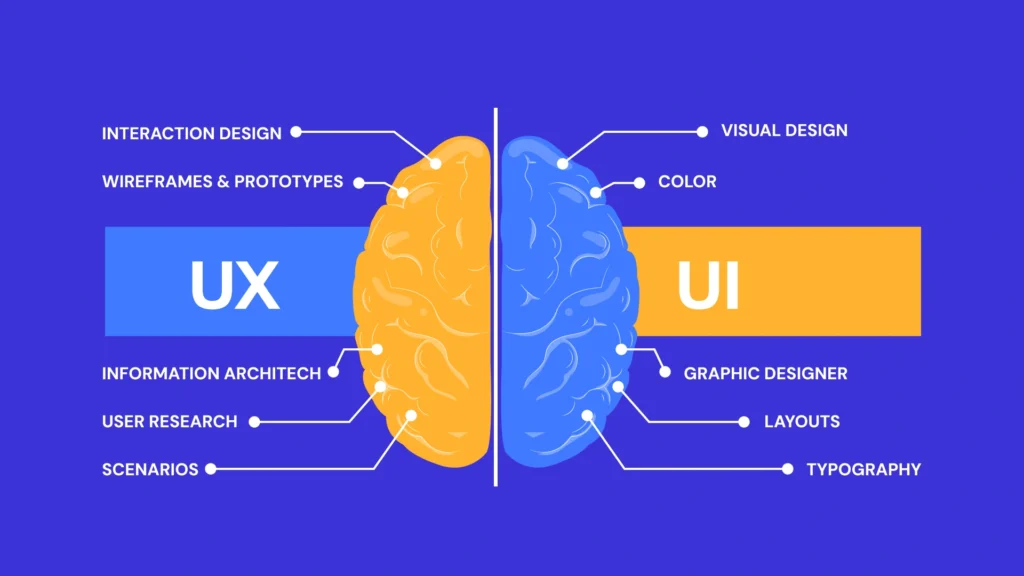
User Interface (UI) design focuses on the visual and interactive elements of a website, while User Experience (UX) design focuses on how easy, useful, and intuitive the overall experience feels.
When UI and UX work together effectively, a website becomes easier to navigate, more professional, and better equipped to guide visitors toward meaningful actions such as requesting a quote, making a purchase, booking an appointment, submitting a form, or calling the business.
In this article, we explore how better UI/UX design can improve website engagement and conversions and which areas businesses should prioritize.
What Is UI Design?
UI stands for User Interface.
UI design focuses primarily on how a website looks and how visitors interact with its visual elements.
It includes areas such as:
- Colors
- Typography
- Buttons
- Icons
- Forms
- Navigation menus
- Images
- Cards
- Layouts
- Spacing
- Interactive elements
Good UI design creates visual consistency throughout a website.
For example, primary call-to-action buttons should generally have a consistent appearance so users can easily recognize which elements are clickable and important.
UI design is not simply about making a website attractive. Its purpose is also to make information and actions visually clear.
What Is UX Design?
UX stands for User Experience.
UX design focuses on the overall experience a person has while interacting with a website.
It considers questions such as:
- Can visitors quickly find what they need?
- Is the navigation easy to understand?
- Are important actions obvious?
- Does the website work well on mobile?
- Are forms easy to complete?
- Is important information presented clearly?
- Are there unnecessary steps?
- Does the website load quickly?
A website can look visually impressive while still providing a poor user experience.
For example, a website may use beautiful animations and graphics, but if visitors cannot easily find the contact page or understand the services being offered, the design is not effectively supporting business goals.
UI vs. UX: What’s the Difference?
UI and UX are closely connected, but they serve different purposes.
UI design is primarily about the interface.
UX design is primarily about the experience.
Consider a contact form.
UI design determines how the fields, labels, button, colors, and spacing look.
UX design considers whether the form is easy to understand, whether it asks for unnecessary information, whether validation messages are helpful, and whether users can complete it easily on a mobile device.
A high-performing business website needs both.
How UI/UX Design Improves Website Engagement
Website engagement reflects how visitors interact with your content and features.
Better UI/UX design can remove unnecessary friction and encourage visitors to explore more of the website.
Here are some of the most important ways it can help.
1. Better First Impressions
Visitors often form an impression of a website very quickly.
A cluttered, outdated, or inconsistent design can make a business appear less professional.
A clean interface can immediately communicate credibility and organization.
Important elements include:
- Consistent branding
- Professional typography
- High-quality images
- Balanced spacing
- Clear headings
- Well-designed buttons
- Logical content sections
Your homepage should quickly communicate what your business does and what visitors can do next.
Avoid making people search through several sections before they understand your primary service.
2. Clear Navigation Keeps Visitors Exploring
Navigation is a fundamental part of user experience.
Visitors should be able to move through your website without wondering where important information is located.
For many small business websites, navigation may include:
Home | About | Services | Service Areas | Blog | Contact
Businesses offering several services can organize them logically within a dropdown menu.
Avoid unnecessarily complicated menus containing dozens of choices.
A simpler structure can help visitors find relevant information more quickly.
3. Strong Visual Hierarchy Guides Attention
Not every element on a webpage should receive the same visual emphasis.
Visual hierarchy helps visitors understand which information is most important.
Designers can establish hierarchy through:
- Heading sizes
- Font weights
- Spacing
- Section positioning
- Contrast
- Button prominence
- Images
For example, a service landing page might visually prioritize:
Main Heading → Key Benefit → Supporting Information → CTA
This makes the page easier to scan and gives visitors a clearer path through the content.
4. Readable Content Encourages Visitors to Stay
Large blocks of uninterrupted text can be difficult to read, especially on mobile devices.
Good UX design makes content easier to scan.
Instead of presenting a long wall of text, use:
- Short paragraphs
- Descriptive headings
- Subheadings
- Bullet points
- Appropriate white space
- Relevant images
- Highlighted calls to action
Typography also matters.
Text should have sufficient size, spacing, and contrast to remain comfortable to read across different devices.
5. Mobile-Friendly Design Improves the Experience
Responsive design is essential for modern websites.
A visitor using a smartphone should be able to navigate and interact with your website just as easily as someone using a desktop computer.
Mobile UX should consider:
- Readable font sizes
- Touch-friendly buttons
- Simple navigation
- Responsive images
- Easy-to-complete forms
- Click-to-call functionality
- Appropriate spacing
- No unwanted horizontal scrolling
Designing for smaller screens can also encourage businesses to prioritize the most important content and actions.
6. Faster Websites Reduce Friction
Website speed and user experience are closely related.
Visitors may become frustrated when pages take too long to load or when interface elements respond slowly.
Common causes of poor performance include:
- Oversized images
- Excessive animations
- Heavy JavaScript
- Too many third-party scripts
- Unnecessary plugins
- Poor hosting
- Unoptimized fonts
- Background videos
A visually impressive website should not sacrifice usability for unnecessary effects.
Performance should be considered during the design and development process rather than treated only as a technical issue after launch.
How UI/UX Design Can Improve Conversions
Engagement is important, but most business websites ultimately need visitors to take action.
A conversion might include:
- Purchasing a product
- Requesting a quote
- Booking an appointment
- Calling the business
- Sending an inquiry
- Creating an account
- Scheduling a consultation
- Subscribing to a newsletter
Good UI/UX design helps make these actions easier.
7. Clear Calls to Action Guide Visitors
Visitors should not have to guess what to do next.
A strong call to action provides a clear next step.
Examples include:
Request a Free Quote
Schedule a Consultation
Book an Appointment
Call Us Today
Start Your Project
Contact Our Team
The wording should match the action users will actually complete.
CTA buttons should also be visually distinguishable from ordinary text and secondary actions.
8. Strategic CTA Placement Creates More Opportunities
A common mistake is placing a single contact button at the bottom of a long page.
Not every visitor will reach the bottom.
Consider placing calls to action at natural decision points throughout the page.
For example:
- Hero section
- After explaining a service
- After presenting benefits
- Near testimonials
- At the end of FAQs
- Final CTA section
This gives visitors multiple opportunities to take action without making the page unnecessarily aggressive.
9. Simpler Forms Can Reduce Friction
Forms are often critical conversion points.
Asking for too much information too early can create unnecessary friction.
For a basic service inquiry, you may only need:
- Name
- Phone
- Service
- Message
Additional fields should have a clear purpose.
Form design should also include clear labels, understandable validation messages, mobile-friendly fields, and an obvious submit button.
After submission, provide confirmation so the user knows their message was successfully received.
10. Trust Signals Support Decision-Making
Visitors may hesitate to contact a company they do not know.
Good UX makes trust-building information easy to find.
Depending on the business, trust signals can include:
- Genuine customer reviews
- Testimonials
- Certifications
- Licenses
- Industry memberships
- Years of experience
- Team information
- Completed projects
- Case studies
- Secure payment indicators
- Clear contact details
Trust signals should be placed naturally throughout the customer journey instead of being hidden on one page.
11. Testimonials Can Strengthen Important Pages
Customer testimonials can help visitors understand the experiences of previous customers.
Instead of creating only a separate testimonials page, consider displaying selected reviews on:
- Homepage
- Service pages
- Product pages
- Landing pages
- Contact pages
Whenever possible, use genuine and specific feedback rather than vague or generic testimonials.
12. Consistent Design Builds Familiarity
Consistency makes websites easier to understand.
If buttons change appearance from page to page or headings use completely different styles, visitors may have difficulty recognizing patterns.
Create consistent rules for:
- Colors
- Typography
- Buttons
- Forms
- Icons
- Spacing
- Cards
- Headings
- Section layouts
Consistency does not mean every page must look identical. It means the website should feel like one connected digital experience.
13. Good UX Removes Unnecessary Steps
Every unnecessary step between a visitor and their goal can create friction.
For example, if someone wants to request a quote, they should not need to visit multiple unrelated pages before finding the form.
Review important customer journeys.
Ask:
How many steps does it take to contact us?
How many steps does it take to purchase a product?
Can users easily find pricing information?
Can mobile users call us directly?
Can visitors quickly find the service they need?
Reducing unnecessary complexity can create a smoother conversion path.
14. Better Service Pages Can Generate More Leads
Service pages should do more than describe what you offer.
A well-designed service page can guide visitors through the entire decision-making process.
A strong structure might include:
Clear Headline
Immediately identify the service.
Short Introduction
Explain what you provide and who it is for.
Benefits
Explain the value customers receive.
Service Details
Describe what is included.
Your Process
Explain what happens after the customer contacts you.
Trust Signals
Include relevant reviews, experience, certifications, or project examples.
FAQs
Address common questions or concerns.
Call to Action
Give visitors a clear way to proceed.
This structure combines useful content with conversion-focused UX.
15. Good E-commerce UX Can Simplify Purchasing
For e-commerce websites, usability directly affects the shopping experience.
Customers should be able to move easily from product discovery to checkout.
Important e-commerce UX features include:
- Clear product categories
- Useful search functionality
- Product filters
- High-quality product images
- Clear pricing
- Product descriptions
- Shipping information
- Visible cart
- Simple checkout
- Mobile-friendly payment experience
Unexpected costs, confusing navigation, or overly complicated checkout processes can create friction before a purchase is completed.
16. Accessibility Improves Usability
Good UX should consider people with different abilities and ways of interacting with websites.
Accessibility considerations can include:
- Sufficient color contrast
- Keyboard navigation
- Descriptive form labels
- Meaningful alternative text
- Clear focus states
- Logical heading structure
- Readable text
- Captions for relevant video content
Accessibility should be considered throughout design and development rather than added only after a website is finished.
17. Avoid Too Many Popups and Interruptions
Popups can be useful in certain situations, but excessive interruptions can damage the user experience.
Imagine opening a website and immediately encountering:
- Cookie notice
- Newsletter popup
- Chat window
- Promotional banner
- Location request
- Notification request
The visitor has barely seen the website, yet several elements are already competing for attention.
Use interruptions carefully and prioritize the visitor’s primary reason for visiting.
18. Design Landing Pages Around One Main Goal
Landing pages are usually more effective when they focus on a clear objective.
For example, if the goal is generating roofing quote requests, the page should remain focused on that action rather than directing visitors toward unrelated content.
A conversion-focused landing page might include:
Headline → Benefit → Service Information → Trust Signals → Reviews → FAQs → Quote Form
Keep the primary CTA consistent throughout the page.
19. Use Real Images Where Possible
Authentic images can help communicate credibility.
For service businesses, consider using real photos of:
- Your team
- Office
- Equipment
- Completed projects
- Work in progress
- Business location
Stock photography can still be useful, but it should support the content rather than create a misleading impression about your business.
20. Use Data to Improve UI/UX
Website design decisions should not always be based on personal preference.
Analytics and user behavior can reveal where visitors encounter problems.
Businesses can analyze:
- Popular pages
- Conversion rates
- Form submissions
- Device types
- Traffic sources
- User journeys
- Page performance
- CTA interactions
For appropriate websites, additional UX research methods such as usability testing can provide even more insight.
The goal is to identify friction and improve the experience based on evidence.
Common UI/UX Mistakes That Can Hurt Conversions
Even attractive websites can have usability problems.
Common mistakes include:
- Unclear navigation
- Too many menu options
- Small mobile buttons
- Poor text contrast
- Excessive animations
- Slow-loading pages
- Confusing forms
- Weak calls to action
- Too many popups
- Inconsistent button styles
- Poor mobile layouts
- Large walls of text
- Hidden contact information
- Unclear pricing
- Broken links
- Horizontal mobile scrolling
- Complicated checkout processes
Fixing these issues can sometimes be more valuable than completely redesigning a website.
UI/UX Checklist for a Business Website
When reviewing your website, check the following:
- Is the website mobile-responsive?
- Does the homepage clearly explain what the business does?
- Is navigation easy to understand?
- Are important services easy to find?
- Are headings clear and descriptive?
- Is body text easy to read?
- Are buttons easy to identify?
- Are calls to action clearly visible?
- Are contact forms simple?
- Is the website fast?
- Are images optimized?
- Are testimonials genuine?
- Is contact information easy to find?
- Are important trust signals visible?
- Is the website accessible?
- Are there unnecessary popups?
- Is the design consistent?
- Can users easily complete the main conversion action?
If several answers are “no,” there may be opportunities to improve the user experience.
UI/UX and SEO Work Together
UI/UX and SEO should not be treated as completely separate strategies.
SEO can help people discover your website, while UI/UX helps those visitors navigate and interact with it effectively.
For example, a well-optimized service page may attract visitors through organic search. Once they arrive, its design determines how easily they can understand the service, explore supporting information, establish trust, and contact the business.
A successful website therefore needs both visibility and usability.
SEO brings opportunities to the website. Good UI/UX helps make better use of those opportunities.
Should You Redesign Your Website?
A website redesign may be worth considering when your current website:
- Looks outdated
- Performs poorly on mobile
- Loads slowly
- Has confusing navigation
- Generates traffic but few inquiries
- Has inconsistent branding
- Makes services difficult to find
- Uses complicated forms
- Has poor readability
- No longer represents your business accurately
However, a complete redesign is not always necessary.
Sometimes improving navigation, CTAs, page layouts, forms, mobile responsiveness, or website speed can create a significantly better experience without rebuilding the entire site.
Final Thoughts
Better UI/UX design is not simply about making a website look more attractive.
It is about making the website easier to understand, easier to navigate, and easier to use.
A strong user experience helps visitors find information quickly, understand your services, build confidence in your business, and complete important actions with less friction.
Focus on clear navigation, mobile responsiveness, website speed, readable content, strong visual hierarchy, simple forms, visible calls to action, accessibility, and consistent design.
Most importantly, design your website around the needs of your customers.
When visitors can quickly understand what you offer, why they should trust you, and what they should do next, your website is in a much stronger position to turn traffic into genuine business opportunities.
Improve Your Website’s UI/UX and Conversion Experience
If your website looks outdated, is difficult to navigate, or is not generating enough inquiries, improving its UI/UX can help create a more professional and conversion-focused online presence.
Adeel Web Solutions provides professional website design and development, WordPress development, e-commerce development, landing page design, website redesign, maintenance, and performance optimization services.
We focus on creating responsive, user-friendly websites that combine professional design with clear navigation, strong calls to action, and practical conversion paths.
Contact Adeel Web Solutions today to discuss your website and discover how better UI/UX design can create a stronger experience for your visitors.
