

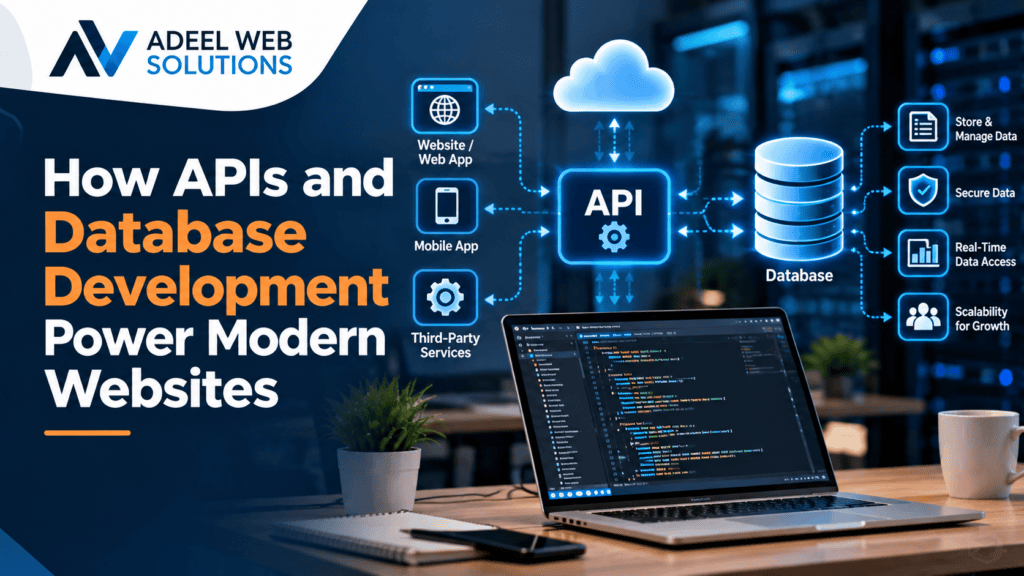
How APIs and Database Development Power Modern Websites
Modern websites do much more than display text and images. They process customer enquiries, manage accounts, accept payments, display real-time information, connect with external platforms, store business data, and automate important workflows.
Two technologies that make much of this possible are APIs and databases.
Databases provide an organized way to store and manage information, while APIs allow websites and other software systems to communicate with each other. Together, they form an important part of the backend infrastructure behind many modern websites and web applications.
When a customer places an online order, books an appointment, logs into an account, searches for a product, or submits a contact form, APIs and databases may be working behind the scenes to complete the request.
For businesses, understanding their role can make it easier to plan websites that are scalable, connected, efficient, and capable of supporting future growth.
This article explains how APIs and database development power modern websites and why they are increasingly important for businesses.
What Is an API?
API stands for Application Programming Interface.
An API provides a structured way for different software systems to communicate with one another.
Instead of requiring a website to contain every service and piece of information internally, APIs allow it to request data or functionality from another application.
For example, a website might use an API to:
- Process a payment
- Display map information
- Send customer data to a CRM
- Retrieve product inventory
- Connect to an appointment system
- Send marketing information
- Obtain shipping rates
- Synchronize data with business software
- Display information from another platform
The API defines how these requests and responses should be structured.
This allows different applications to work together even when they are built using different technologies.
What Is a Database?
A database is a structured system for storing, organizing, retrieving, and updating information.
Most dynamic websites rely on databases in some form.
A business website database might contain:
- Website pages
- Blog articles
- User accounts
- Customer information
- Products
- Orders
- Appointments
- Form submissions
- Inventory
- Locations
- Testimonials
- Membership information
- Website settings
When someone visits a dynamic webpage, the backend may retrieve the required information from a database and use it to generate the content displayed to the visitor.
Databases make it possible to manage large amounts of information without manually creating separate static files for every item.
How APIs and Databases Work Together
APIs and databases often work together as part of a website’s backend architecture.
Consider an online store.
When a customer opens a product page, the website may retrieve product information from its database.
When the customer enters a delivery address, the website might communicate with a shipping provider through an API to calculate available shipping options.
During checkout, another API may communicate with a payment service.
After the transaction, the website may save order information in its database and use another API to send customer information to a CRM.
A simplified process might look like this:
Customer Action → Website Frontend → Backend → Database/API → Backend Response → Updated Frontend
This entire process can happen within seconds.
1. Databases Power Dynamic Website Content
Static websites contain information directly within individual pages.
Dynamic websites can retrieve information from databases and display it according to the user’s request.
For example, an e-commerce website may have thousands of products.
Instead of manually creating completely independent HTML files for every product, product information can be stored in a database.
The database might contain fields such as:
- Product name
- Description
- Price
- SKU
- Images
- Category
- Stock quantity
- Product attributes
When a visitor opens a product page, the website retrieves the relevant information and displays it through a predefined page layout.
This makes large websites significantly easier to manage.
2. APIs Connect Websites With External Services
Modern businesses often use multiple software platforms.
A company might use one platform for its website, another for customer relationship management, another for payments, and another for email marketing.
APIs allow these systems to exchange information.
For example, a website enquiry could follow this process:
Visitor Submits Form → Website Processes Enquiry → API Sends Lead to CRM → Sales Team Receives Lead
Without an integration, an employee might need to manually copy the information from the website into the CRM.
API integration can reduce this repetitive work.
3. APIs Make Online Payments Possible
Online payment processing is one of the most familiar examples of API-powered functionality.
When a customer makes a purchase, the website may communicate with a payment provider to process the transaction.
The website sends the required transaction information, the payment service processes the request, and a response is returned.
Depending on the implementation, the website can then:
- Confirm the order
- Update order status
- Store relevant transaction references
- Send confirmation notifications
- Begin fulfillment processes
Using established payment providers allows businesses to integrate payment functionality without attempting to create an entire payment-processing infrastructure themselves.
Payment integrations must still be implemented carefully and according to the provider’s security requirements.
4. Databases Power E-Commerce Websites
E-commerce websites depend heavily on databases.
An online store may need to manage information about:
- Products
- Categories
- Customers
- Orders
- Inventory
- Coupons
- Shipping
- Taxes
- Product variations
- Reviews
When customers browse a store, database queries retrieve the appropriate products.
When an order is placed, new information is written to the database.
When inventory changes, the corresponding records may also need to be updated.
Reliable database development is therefore essential for e-commerce operations.
Poor database performance or inconsistent data can affect both customers and administrators.
5. APIs Support CRM Integration
Customer relationship management systems help businesses organize leads and customer interactions.
Instead of manually transferring website enquiries into a CRM, an API integration can automate the process.
For example:
Contact Form → Website Backend → CRM API → New Lead Created
Additional information can sometimes be included, such as:
- Name
- Phone number
- Requested service
- Lead source
- Campaign information
- Message
This can make lead management more efficient and reduce manual data entry.
The exact functionality depends on the CRM and the capabilities of its API.
6. Databases Make User Accounts Possible
Websites that provide user accounts need to store information about registered users.
Depending on the platform, a database may contain:
- User ID
- Name
- Email address
- Account settings
- Roles
- Preferences
- Order history
- Membership information
Sensitive information needs to be handled appropriately.
Passwords, for example, should not simply be stored as readable text. Secure authentication systems typically store appropriately hashed password representations.
Backend logic then communicates with the database when users register, log in, update their profiles, or access account-specific information.
7. APIs Power Booking and Scheduling Integrations
Businesses that rely on appointments can use APIs to connect websites with scheduling platforms.
A customer may choose a service and request an available appointment directly from the website.
Behind the interface, an API may be used to:
- Retrieve availability
- Create bookings
- Update schedules
- Cancel appointments
- Reschedule appointments
- Synchronize calendar information
This can help reduce manual scheduling work.
It can also provide customers with the convenience of booking services online without waiting for a business to respond manually.
8. APIs Can Connect Websites With Email Marketing Platforms
Businesses often collect email subscribers or leads through website forms.
Instead of exporting and importing these contacts manually, API integrations can send information directly to an email marketing platform.
A workflow might look like:
Visitor Subscribes → Website Validates Submission → API Adds Subscriber → Marketing Platform Updates List
Businesses can then use their marketing platform to manage appropriate email campaigns and customer communications.
Integrations should respect consent requirements, privacy obligations, and the policies of the platforms involved.
9. Databases Power Website Search
Website search is another feature that often depends on databases.
When a visitor enters a search query, the backend can search relevant database records and return matching results.
Search functionality may be used for:
- Blog articles
- Products
- Services
- Properties
- Locations
- Documents
- Knowledge bases
More advanced websites may provide filters that allow users to narrow results according to attributes such as price, category, location, date, or availability.
Good database structure can make these search and filtering features easier to develop and maintain.
10. APIs Enable Real-Time or Frequently Updated Information
Some websites need information that changes regularly.
Instead of manually updating the website whenever information changes, an API may retrieve current data from another system.
Examples can include:
- Inventory levels
- Shipping information
- Appointment availability
- Account information
- Product data
- Business system records
This can help keep information synchronized across multiple platforms.
However, API reliability must be considered carefully.
If an external service becomes unavailable, the website should handle the situation appropriately rather than simply breaking.
11. Databases Support Content Management Systems
Content management systems such as WordPress rely heavily on databases.
When you create or update content in WordPress, information is stored in a database.
This may include:
- Pages
- Posts
- Users
- Comments
- Website settings
- Custom post types
- Plugin information
- Other structured content
When a visitor opens a page, WordPress retrieves the necessary information and generates the page.
This database-driven approach allows website owners to manage content through an administrative interface instead of manually editing website files.
12. APIs and WordPress Development
WordPress can connect with external applications using APIs.
This makes it possible to integrate WordPress websites with business systems and third-party services.
Examples may include:
- CRM integration
- External booking systems
- Payment providers
- Marketing platforms
- Inventory software
- Custom applications
- Mobile applications
WordPress also provides its own REST API, which developers can use for certain integrations and custom applications.
For businesses, this means WordPress can serve as part of a larger digital ecosystem rather than operating only as an isolated website.
13. APIs and WooCommerce
WooCommerce stores extensive e-commerce information and can also communicate with external systems.
API integrations may be used to connect an online store with:
- Inventory systems
- Accounting platforms
- Shipping providers
- CRM software
- Mobile applications
- Order management systems
- Custom dashboards
For example, when an order is placed, an integration could send relevant order information to another business system.
Similarly, inventory changes in an external system may be synchronized with the online store when the integration supports it.
This can reduce duplicated work and help businesses keep information consistent.
14. Database Performance Affects Website Speed
As a database grows, performance becomes increasingly important.
Poorly optimized database queries can slow down pages and administrative processes.
Potential issues may include:
- Inefficient queries
- Missing indexes
- Excessive database requests
- Large unnecessary records
- Poor data structures
- Unoptimized searches
Database optimization can involve improving queries, adding appropriate indexes, cleaning unnecessary information, implementing caching, and reviewing how the application accesses data.
The correct approach depends on the website and its database technology.
A fast frontend cannot completely compensate for slow database operations.
15. API Performance Also Matters
Every external API request can potentially affect website performance.
If a webpage waits for several slow third-party services before displaying important information, the visitor may experience delays.
Professional developers therefore need to consider:
- API response times
- Timeouts
- Caching
- Error handling
- Rate limits
- Request frequency
- Fallback behavior
Not every piece of external information needs to be requested every time a page loads.
Caching appropriate API responses can sometimes improve performance and reduce unnecessary requests.
16. API Security Is Essential
APIs can provide access to important functionality and data, so security is critical.
API development and integration may involve practices such as:
- Authentication
- Authorization
- Secure credentials
- HTTPS
- Input validation
- Rate limiting
- Access restrictions
- Logging
- Error handling
API keys and other credentials should not be unnecessarily exposed in public frontend code.
Sensitive operations are often better handled through secure server-side systems.
The appropriate security approach depends on the API and the information being processed.
17. Database Security Protects Business Information
Databases may contain valuable or sensitive information.
Developers need to protect database access and ensure applications interact with databases securely.
Important practices can include:
- Secure database credentials
- Appropriate permissions
- Input validation
- Parameterized queries
- Regular backups
- Software updates
- Restricted database access
- Monitoring
- Encryption where appropriate
Businesses should also avoid collecting or retaining unnecessary information.
The less sensitive data a business stores unnecessarily, the less data it has to protect.
18. APIs Can Automate Business Workflows
API integration can be especially valuable when it eliminates repetitive manual processes.
Imagine a business receiving website enquiries.
Without automation:
Customer Submits Form → Employee Reads Email → Employee Opens CRM → Employee Creates Lead → Employee Copies Information
With an appropriate integration:
Customer Submits Form → Website Sends Data Through API → CRM Creates Lead Automatically
Similar workflows can be created for:
- Orders
- Appointments
- Notifications
- Inventory updates
- Marketing systems
- Accounting processes
- Customer support
Automation can save time and reduce errors caused by repeatedly entering the same information into different systems.
19. APIs Make Custom Web Applications More Powerful
Custom web applications often need to communicate with several external services.
A business platform might use APIs for:
- Payments
- Maps
- Messaging
- Authentication
- Analytics
- File storage
- CRM functionality
- Artificial intelligence services
- Business data
Instead of developing every capability from the beginning, developers can integrate specialized services where appropriate.
This can make sophisticated applications possible without requiring one company to build every underlying system itself.
20. Good Database Design Supports Business Growth
Database design decisions made early in a project can affect future development.
As businesses grow, databases may need to handle:
- More customers
- More products
- More transactions
- More locations
- More content
- More integrations
A poorly structured database can become increasingly difficult to maintain as the amount of information grows.
Professional database development considers how data relates, how it will be queried, and how requirements may evolve.
This does not mean small websites need unnecessarily complicated database architecture.
The goal is to create a structure appropriate for the current project while allowing reasonable future development.
API Integration vs Custom API Development
Businesses may encounter two related but different services.
API Integration
API integration involves connecting your website with an API that already exists.
For example, connecting your website to a CRM or payment service.
Custom API Development
Custom API development involves creating an API that allows your own system to communicate with other applications.
For example, a business with a custom platform may develop an API so its mobile application can retrieve customer information.
Custom API development is usually more relevant when a business owns specialized software, data, or workflows that need to communicate with other systems.
Do All Business Websites Need APIs?
No.
A simple business website may not require many external integrations.
If the website primarily displays services, company information, articles, and a contact form, its API requirements may be limited.
APIs become more valuable when a business needs to connect its website with other software or provide advanced functionality.
The goal should not be to use APIs simply because they are modern technology.
Every integration should solve a real business or customer problem.
Does Every Website Need a Database?
Not necessarily.
Very simple static websites can operate without a traditional database.
However, many modern business websites use content management systems or dynamic functionality that relies on databases.
WordPress websites, online stores, membership platforms, booking systems, directories, and customer portals typically depend heavily on database functionality.
The correct architecture depends on what the website needs to accomplish.
Choosing the Right API and Database Solutions
When planning a new website or web application, businesses should consider both current and future requirements.
Important questions include:
- What information needs to be stored?
- Who needs access to the information?
- Which external systems need to connect?
- How frequently will information change?
- What security requirements apply?
- How much traffic is expected?
- Will customers have accounts?
- Will the website process transactions?
- Does information need to synchronize with other systems?
- What happens if an external API becomes unavailable?
Answering these questions can help developers recommend an appropriate architecture.
Why Professional API and Database Development Matters
APIs and databases often operate behind the scenes, but they can directly affect the reliability of a website.
Poor implementation can result in:
- Slow pages
- Failed integrations
- Duplicate information
- Missing data
- Broken forms
- Incorrect inventory
- Security risks
- Difficult maintenance
Professional development focuses on creating systems that are secure, maintainable, efficient, and appropriate for the business requirement.
Businesses do not need the most complicated architecture.
They need an architecture that reliably supports their goals.
Build a More Connected Website With Professional Development
Modern websites increasingly need to communicate with other platforms while managing growing amounts of business data.
APIs provide the connections, while databases provide the organized information that powers dynamic functionality.
Together, they can support e-commerce, customer accounts, bookings, CRM integration, automation, search, content management, and custom web applications.
At Adeel Web Solutions, we provide professional backend development, API integration, database development, WordPress development, e-commerce development, custom web development, and website maintenance services.
Whether you need to connect your website to third-party software, develop custom functionality, improve an existing database, or build a more advanced web application, we can help create a solution based on your business requirements.
Need API integration or database development for your website?
Contact Adeel Web Solutions to discuss your project and development requirements.
